I made a lulu in lecture on Monday February 9, and I know you folks have encountered similar snags on HW, so let’s unpack it.
Background
I was cleaning this dataset:
library(tidyverse)survey<-read_csv("data/survey-2026-02-09.csv")|>rename( tue_classes =`How many classes do you have on Tuesdays?`, year =`What year are you?`)survey
# A tibble: 11 × 2
   tue_classes                                n
   <chr>                                  <int>
 1 0                                         13
 2 1                                         62
 3 1 class, 1 lab, 1 volunteering session     1
 4 2                                        118
 5 3                                         65
 6 4                                          7
 7 One                                        2
 8 Three                                      2
 9 Two                                        4
10 Two in both days                           1
11 two                                        1
And thank goodness you did! There would have been no lesson otherwise. Anyway, the end goal is to clean up the tue_classes column so that it is literally a column of numbers instead of a column of text. I demo-ed this in phases.
The first thing I ran
I knew this wouldn’t work:
survey<-survey|>mutate( tue_classes =case_when(tue_classes=="1 class, 1 lab, 1 volunteering session"~2,tue_classes=="One"~1,tue_classes=="Three"~3,tue_classes=="Two"~2,tue_classes=="Two in both days"~3,tue_classes=="two"~2, .default =tue_classes))
Error in `mutate()`:
ℹ In argument: `tue_classes = case_when(...)`.
Caused by error in `case_when()`:
! Can't combine `..1 (right)` <double> and `.default` <character>.
That error message is actually pretty good. It’s saying inside mutate and inside case_when, there was an error because you can’t combine type <double> and type character. All true. The columns of a data frame are just vectors in R, and vectors need to contain values of all the same type. You can’t mix and match. Our case_when statement is saying “in the six weird cases, make tue_classes and number (1, 2, etc), and in all other cases (.default), keep it the way it is.” Well, tue_classes comes to us as type <character>, so our original attempt at case_when is effectively asking the computer to mix and match types, which is forbidden. So we moved on…
The second thing I ran
survey<-survey|>mutate( tue_classes =case_when(tue_classes=="1 class, 1 lab, 1 volunteering session"~"2",tue_classes=="One"~"1",tue_classes=="Three"~"3",tue_classes=="Two"~"2",tue_classes=="Two in both days"~"3",tue_classes=="two"~"2", .default =tue_classes))
We’ve cleaned up all of those goofy cases. Everything appears as a numeral, but the column is still type character. To wrap up, we need to convert using as.numeric.
The third thing I ran
survey<-survey|>mutate( tue_classes =case_when(tue_classes=="1 class, 1 lab, 1 volunteering session"~"2",tue_classes=="One"~"1",tue_classes=="Three"~"3",tue_classes=="Two"~"2",tue_classes=="Two in both days"~"3",tue_classes=="two"~"2", .default =tue_classes), tue_classes =as.numeric(tue_classes))
…Okay. So why did JZ stand there for what felt like an eternity looking like a chinless fool? Because dear students, he made the mistake of running that exact same chunk of (correct!) code again.
The fourth thing I (mistakenly) ran
It’s the exact same code as before. I just hit “Run” on the code chunk a second time:
survey<-survey|>mutate( tue_classes =case_when(tue_classes=="1 class, 1 lab, 1 volunteering session"~"2",tue_classes=="One"~"1",tue_classes=="Three"~"3",tue_classes=="Two"~"2",tue_classes=="Two in both days"~"3",tue_classes=="two"~"2", .default =tue_classes), tue_classes =as.numeric(tue_classes))
Error in `mutate()`:
ℹ In argument: `tue_classes = case_when(...)`.
Caused by error in `case_when()`:
! Can't combine `..1 (right)` <character> and `.default` <double>.
WTF? It was just working a second ago. Exactly. survey is currently exactly how I want it:
So, if I unnecessarily rerun that code a second time, I am now applying it to the new and improved data frame where tue_classes is numeric type. But that means when I apply the case_when statement, I’m mixing types again! Before, the types got mixed up because tue_classes was character type and I was trying to convert the special cases to numbers. Now, the types get mixed up because tue_classes is numeric type and I am trying to convert the special cases to characters.
The Full Monty
When I re-ran the whole darn thing from scratch as Sarah and Hyunjin suggested, we’re all good again:
survey<-read_csv("data/survey-2026-02-09.csv")|>rename( tue_classes =`How many classes do you have on Tuesdays?`, year =`What year are you?`)survey<-survey|>mutate( tue_classes =case_when(tue_classes=="1 class, 1 lab, 1 volunteering session"~"2",tue_classes=="One"~"1",tue_classes=="Three"~"3",tue_classes=="Two"~"2",tue_classes=="Two in both days"~"3",tue_classes=="two"~"2", .default =tue_classes), tue_classes =as.numeric(tue_classes))
If you have a chunk of code that transforms a data frame and overwrites it, you might get some strange behavior if you try to run it multiple times without thinking. The first time you run it, it may do what you want, but if you run it a second or third time, you aren’t applying your changes to the original object that you intended. You are applying them to the modified version after the first run;
This is only a problem when you’re running code chunks à la carte in the editor. What truly matters is what happens when you render your document, because that’s the final product you will actually submit. In my case, re-rendering the slides would have worked great, because all the code chunks are being run once in sequence;
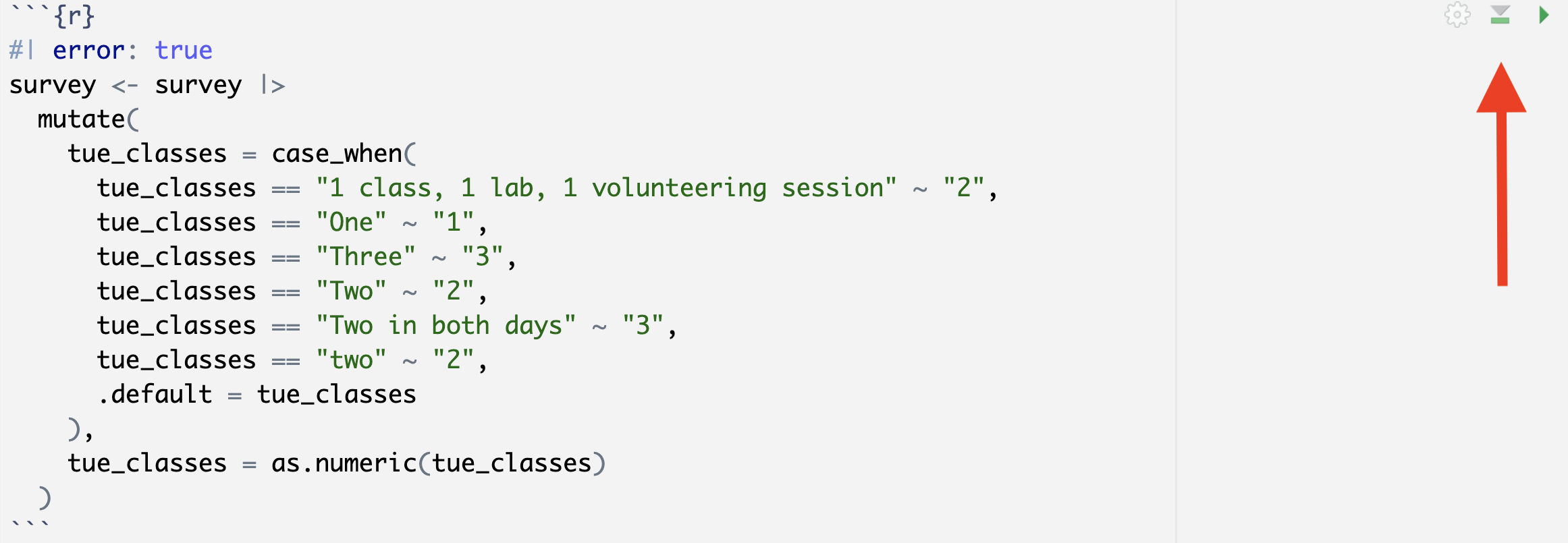
When in doubt, before (re)running a code chunk in isolation, run all of the code chunks above it, in sequence. That will often reset your environment to the state it will be in just before the code you are working on, and then you can see if it’s working how you want. To “run all code chunks above this one,” click the second button in the upper right of the current code chunk: