Data types and classes

Lecture 8

Author
Affiliation

John Zito

Duke University
STA 199 Spring 2026

Published

February 9, 2026

Warm-up

While you wait…

Loading…

Prepare for today’s application exercise: ae-08-durham-climate-factors

  • Go to your ae project in RStudio.

  • Make sure all of your changes up to this point are committed and pushed, i.e., there’s nothing left in your Git pane.

  • Click Pull to get today’s application exercise file: ae-08-durham-climate-factors.qmd.

  • Wait till the you’re prompted to work on the application exercise during class before editing the file.

Data types

How many classes do you have on Tuesdays?

survey
# A tibble: 276 × 3
   Timestamp         How many classes do you have on Tues…¹ `What year are you?`
   <chr>             <chr>                                  <chr>               
 1 2/9/2026 11:03:46 3                                      First-year          
 2 2/9/2026 11:29:24 2                                      Sophomore           
 3 2/9/2026 11:33:44 2                                      Sophomore           
 4 2/9/2026 11:33:48 2                                      Sophomore           
 5 2/9/2026 11:33:56 1                                      First-year          
 6 2/9/2026 11:33:56 3                                      First-year          
 7 2/9/2026 11:33:58 3                                      Sophomore           
 8 2/9/2026 11:34:07 3                                      Sophomore           
 9 2/9/2026 11:34:13 2                                      First-year          
10 2/9/2026 11:34:20 3                                      Junior              
# ℹ 266 more rows
# ℹ abbreviated name: ¹​`How many classes do you have on Tuesdays?`
rename() variables

To make them easier to work with…

survey <- survey |>
  rename(
    tue_classes = `How many classes do you have on Tuesdays?`,
    year = `What year are you?`
  )

Variable types

What type of variable is tue_classes?

survey
# A tibble: 276 × 3
   Timestamp         tue_classes year      
   <chr>             <chr>       <chr>     
 1 2/9/2026 11:03:46 3           First-year
 2 2/9/2026 11:29:24 2           Sophomore 
 3 2/9/2026 11:33:44 2           Sophomore 
 4 2/9/2026 11:33:48 2           Sophomore 
 5 2/9/2026 11:33:56 1           First-year
 6 2/9/2026 11:33:56 3           First-year
 7 2/9/2026 11:33:58 3           Sophomore 
 8 2/9/2026 11:34:07 3           Sophomore 
 9 2/9/2026 11:34:13 2           First-year
10 2/9/2026 11:34:20 3           Junior    
# ℹ 266 more rows

Variable types

Why isn’t the tue_classes column numeric?

survey |>
  count(tue_classes)
# A tibble: 11 × 2
   tue_classes                                n
   <chr>                                  <int>
 1 0                                         13
 2 1                                         62
 3 1 class, 1 lab, 1 volunteering session     1
 4 2                                        118
 5 3                                         65
 6 4                                          7
 7 One                                        2
 8 Three                                      2
 9 Two                                        4
10 Two in both days                           1
11 two                                        1

Let’s clean it up

It’s a huge pain in the rear:

survey <- survey |>
  mutate(
    tue_classes = case_when(
      tue_classes == "1 class, 1 lab, 1 volunteering session" ~ "2",
      tue_classes == "One" ~ "1",
      tue_classes == "Three" ~ "3",
      tue_classes == "Two" ~ "2",
      tue_classes == "Two in both days" ~ "2",
      tue_classes == "two" ~ "2",
      .default = tue_classes
    ),
    tue_classes = as.numeric(tue_classes)
  )

survey |>
  count(tue_classes)
# A tibble: 5 × 2
  tue_classes     n
        <dbl> <int>
1           0    13
2           1    64
3           2   125
4           3    67
5           4     7

Data types

Data types in R

  • logical
  • double
  • integer
  • character
  • and some more, but we won’t be focusing on those

Logical & character

logical - Boolean values TRUE and FALSE


typeof(TRUE)
[1] "logical"

character - character strings


typeof("First-year")
[1] "character"

Double & integer

double - floating point numerical values (default numerical type)


typeof(2.5)
[1] "double"
[1] "double"

integer - integer numerical values (indicated with an L)


typeof(3L)
[1] "integer"
typeof(1:3)
[1] "integer"

Concatenation

Vectors can be constructed using the c() function.

  • Numeric vector:
c(1, 2, 3)
[1] 1 2 3

. . .

  • Character vector:
c("Hello", "World!")
[1] "Hello"  "World!"

. . .

  • Vector made of vectors:
c(c("hi", "hello"), c("bye", "jello"))
[1] "hi"    "hello" "bye"   "jello"

Converting between types

with intention…

x <- 1:3
x
[1] 1 2 3
[1] "integer"
y <- as.character(x)
y
[1] "1" "2" "3"
[1] "character"

Converting between types

with intention…

x <- c(TRUE, FALSE)
x
[1]  TRUE FALSE
[1] "logical"
y <- as.numeric(x)
y
[1] 1 0
[1] "double"

Converting between types

without intention…

c(2, "Just this one!")
[1] "2"              "Just this one!"

. . .

R will happily convert between various types without complaint when different types of data are concatenated in a vector, and that’s not always a great thing!

Converting between types

without intention…

c(FALSE, 3L)
[1] 0 3

. . .

c(1.2, 3L)
[1] 1.2 3.0

. . .

c(2L, "two")
[1] "2"   "two"

Explicit vs. implicit coercion

Explicit coercion:

When you call a function like as.logical(), as.numeric(), as.integer(), as.double(), or as.character().

Implicit coercion:

Happens when you use a vector in a specific context that expects a certain type of vector.

You’ve seen explicit coercion before

statsci |> 
  pivot_longer(
    cols = -degree_type,
    values_to = "n",
    names_to = "year"
  )
# A tibble: 60 × 3
   degree_type year      n
   <chr>       <chr> <dbl>
 1 AB2         2011      0
 2 AB2         2012      1
 3 AB2         2013      0
 4 AB2         2014      0
 5 AB2         2015      4
 6 AB2         2016      4
 7 AB2         2017      1
 8 AB2         2018      0
 9 AB2         2019      0
10 AB2         2020      1
# ℹ 50 more rows
statsci |>
  pivot_longer(
    cols = -degree_type,
    values_to = "n",
    names_to = "year",
    names_transform = as.numeric
  )
# A tibble: 60 × 3
   degree_type  year     n
   <chr>       <dbl> <dbl>
 1 AB2          2011     0
 2 AB2          2012     1
 3 AB2          2013     0
 4 AB2          2014     0
 5 AB2          2015     4
 6 AB2          2016     4
 7 AB2          2017     1
 8 AB2          2018     0
 9 AB2          2019     0
10 AB2          2020     1
# ℹ 50 more rows

Data classes

Data classes

  • Vectors are like Lego building blocks
  • We stick them together to build more complicated constructs, e.g. representations of data
  • The class attribute relates to the S3 class of an object which determines its behaviour
    • You don’t need to worry about what S3 classes really mean, but you can read more about it here if you’re curious
  • Examples: factors, dates, and data frames

Factors

R uses factors to handle categorical variables, variables that have a fixed and known set of possible values

class_years <- factor(
  c(
    "First-year", "Sophomore", "Sophomore", "Senior", "Junior"
    )
  )
class_years
[1] First-year Sophomore  Sophomore  Senior     Junior    
Levels: First-year Junior Senior Sophomore
typeof(class_years)
[1] "integer"
class(class_years)
[1] "factor"

More on factors

We can think of factors like character (level labels) and an integer (level numbers) glued together

glimpse(class_years)
 Factor w/ 4 levels "First-year","Junior",..: 1 4 4 3 2
as.integer(class_years)
[1] 1 4 4 3 2

Dates

today <- as.Date("2024-09-24")
today
[1] "2024-09-24"
typeof(today)
[1] "double"
class(today)
[1] "Date"

More on dates

We can think of dates like an integer (the number of days since the origin, 1 Jan 1970) and an integer (the origin) glued together

as.integer(today)
[1] 19990
as.integer(today) / 365 # roughly 55 yrs
[1] 54.76712

Data frames

We can think of data frames like vectors of equal length glued together

df <- data.frame(x = 1:2, y = 3:4)
df
  x y
1 1 3
2 2 4
typeof(df)
[1] "list"
class(df)
[1] "data.frame"

Lists

Lists are a generic vector container; vectors of any type can go in them

l <- list(
  x = 1:4,
  y = c("hi", "hello", "jello"),
  z = c(TRUE, FALSE)
)
l
$x
[1] 1 2 3 4

$y
[1] "hi"    "hello" "jello"

$z
[1]  TRUE FALSE

Lists and data frames

  • A data frame is a special list containing vectors of equal length
df
  x y
1 1 3
2 2 4
  • When we use the pull() function, we extract a vector from the data frame
df |>
  pull(y)
[1] 3 4

Working with factors

Read data in as character strings

survey
# A tibble: 276 × 3
   Timestamp         tue_classes year      
   <chr>                   <dbl> <chr>     
 1 2/9/2026 11:03:46           3 First-year
 2 2/9/2026 11:29:24           2 Sophomore 
 3 2/9/2026 11:33:44           2 Sophomore 
 4 2/9/2026 11:33:48           2 Sophomore 
 5 2/9/2026 11:33:56           1 First-year
 6 2/9/2026 11:33:56           3 First-year
 7 2/9/2026 11:33:58           3 Sophomore 
 8 2/9/2026 11:34:07           3 Sophomore 
 9 2/9/2026 11:34:13           2 First-year
10 2/9/2026 11:34:20           3 Junior    
# ℹ 266 more rows

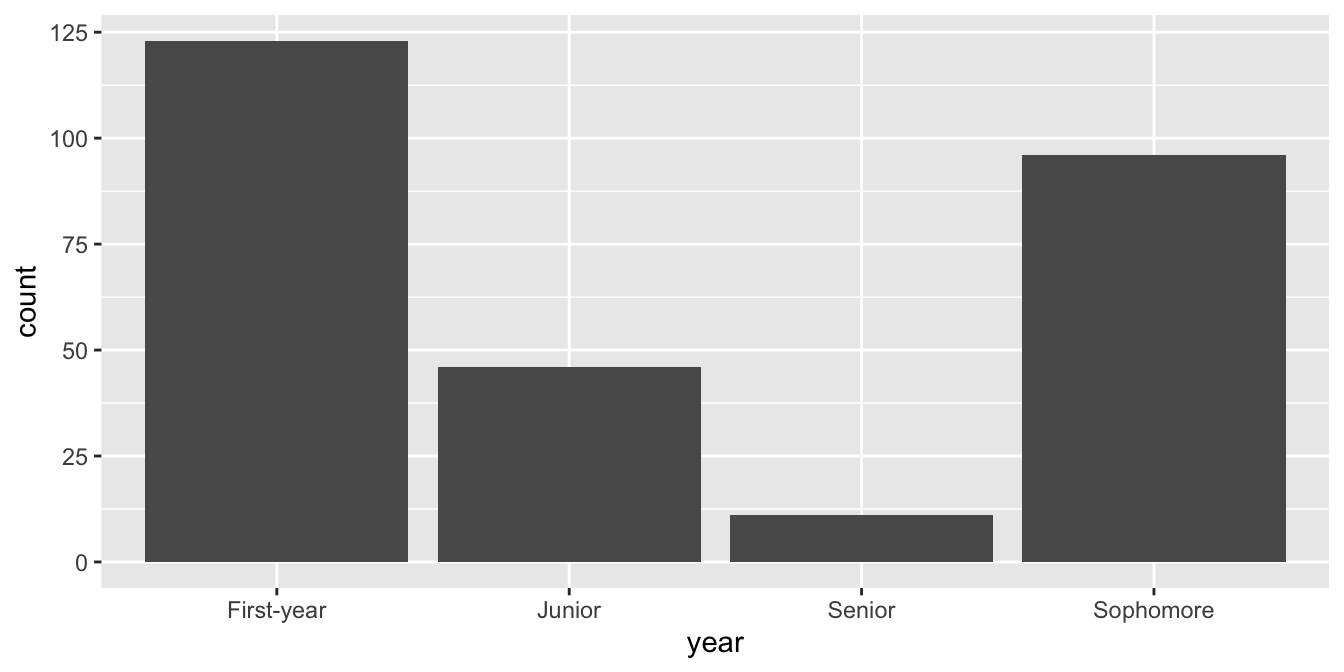
But coerce when plotting

ggplot(survey, mapping = aes(x = year)) +
  geom_bar()

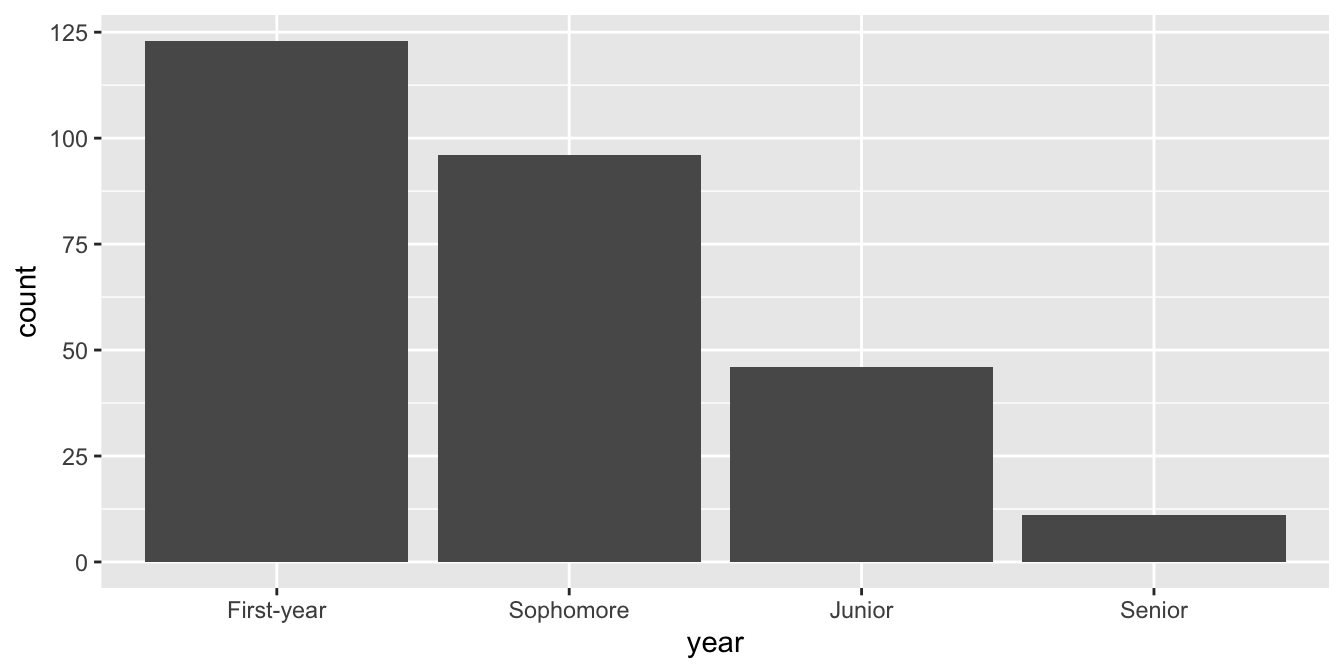
Use forcats to reorder levels

survey |>
  mutate(
    year = fct_relevel(year, "First-year", "Sophomore", "Junior", "Senior")
  ) |>
  ggplot(mapping = aes(x = year)) +
  geom_bar()

A peek into forcats

Reordering levels by:

  • fct_relevel(): hand

  • fct_infreq(): frequency

  • fct_reorder(): sorting along another variable

  • fct_rev(): reversing

. . .

Changing level values by:

  • fct_lump(): lumping uncommon levels together into “other”

  • fct_other(): manually replacing some levels with “other”