movie_scores <- fandango |>
  rename(
    critics = rottentomatoes,
    audience = rottentomatoes_user
)Linear models with a single predictor
Lecture 16
While you wait: Participate 📱💻
Play the game a few times and report your score: smallest absolute difference between your guess and the actual correlation, e.g., if the actual correlation was 0.8 and you guessed 0.6, your score would be 0.2. If the actual correlation was -0.4 and you guessed 0.1, your score would be 0.5.
Option 1 - Calculates your score for you: https://duke.is/corr-game-1
Option 2 - You need to calculate your own score: https://duke.is/corr-game-2
Scan the QR code or go HERE. Log in with your Duke NetID.
Correlation vs. causation
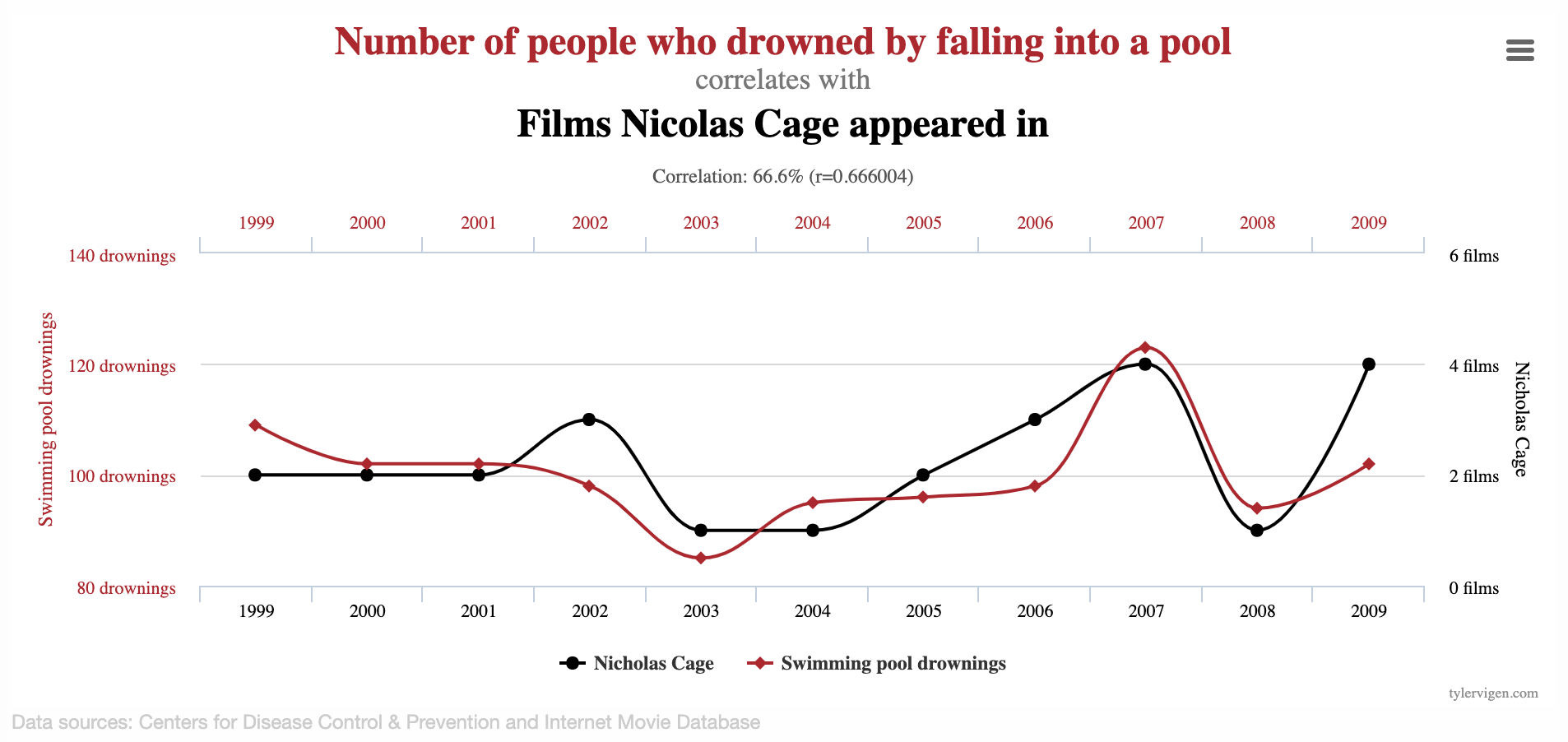
Spurious correlations
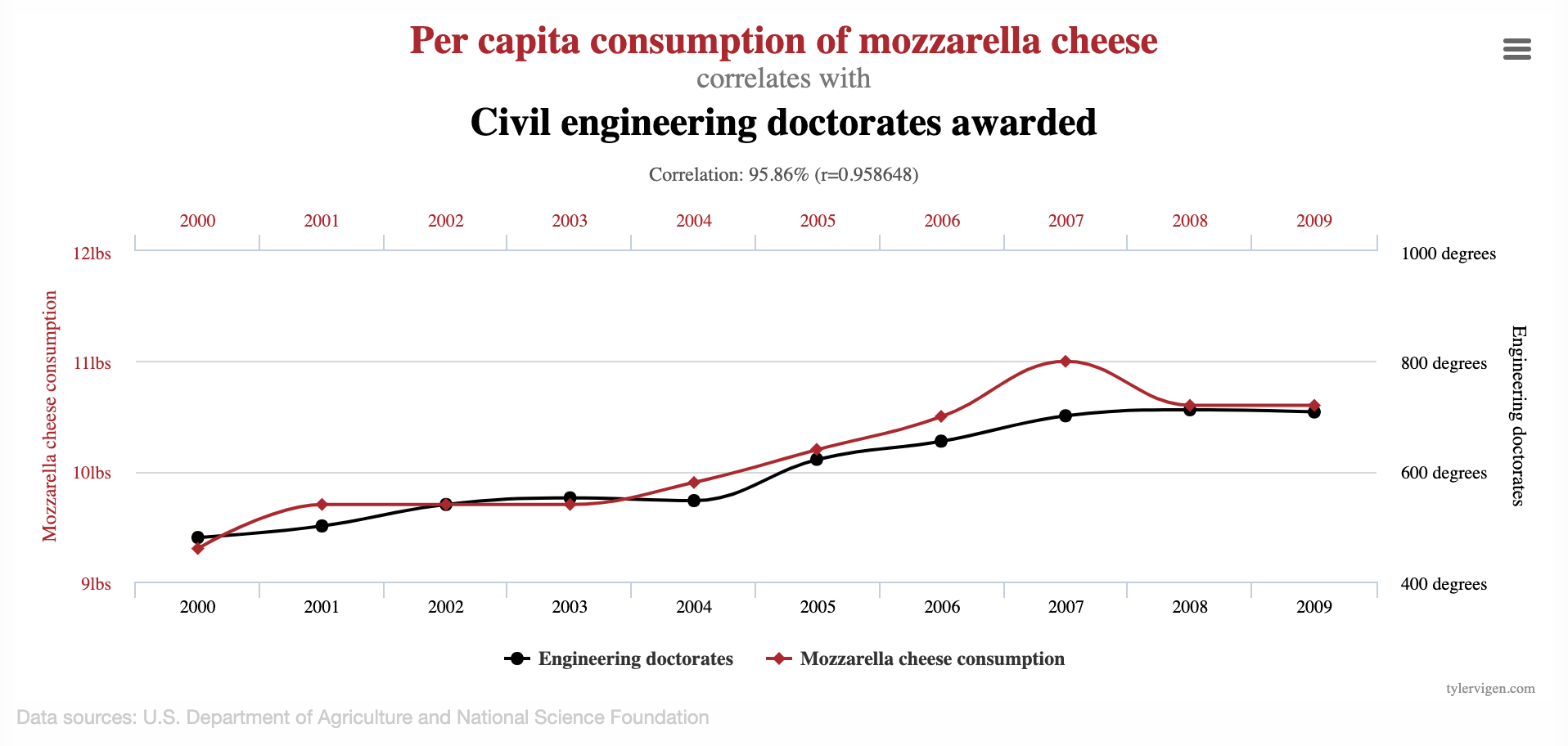
Spurious correlations
Linear regression with a single predictor
Data prep
- Rename Rotten Tomatoes columns as
criticsandaudience - Rename the dataset as
movie_scores
Data overview
movie_scores |>
  select(critics, audience)
# A tibble: 146 × 2
critics audience
<int> <int>
1 74 86
2 85 80
3 80 90
4 18 84
5 14 28
6 63 62
7 42 53
8 86 64
9 99 82
10 89 87
# ℹ 136 more rowsData visualization
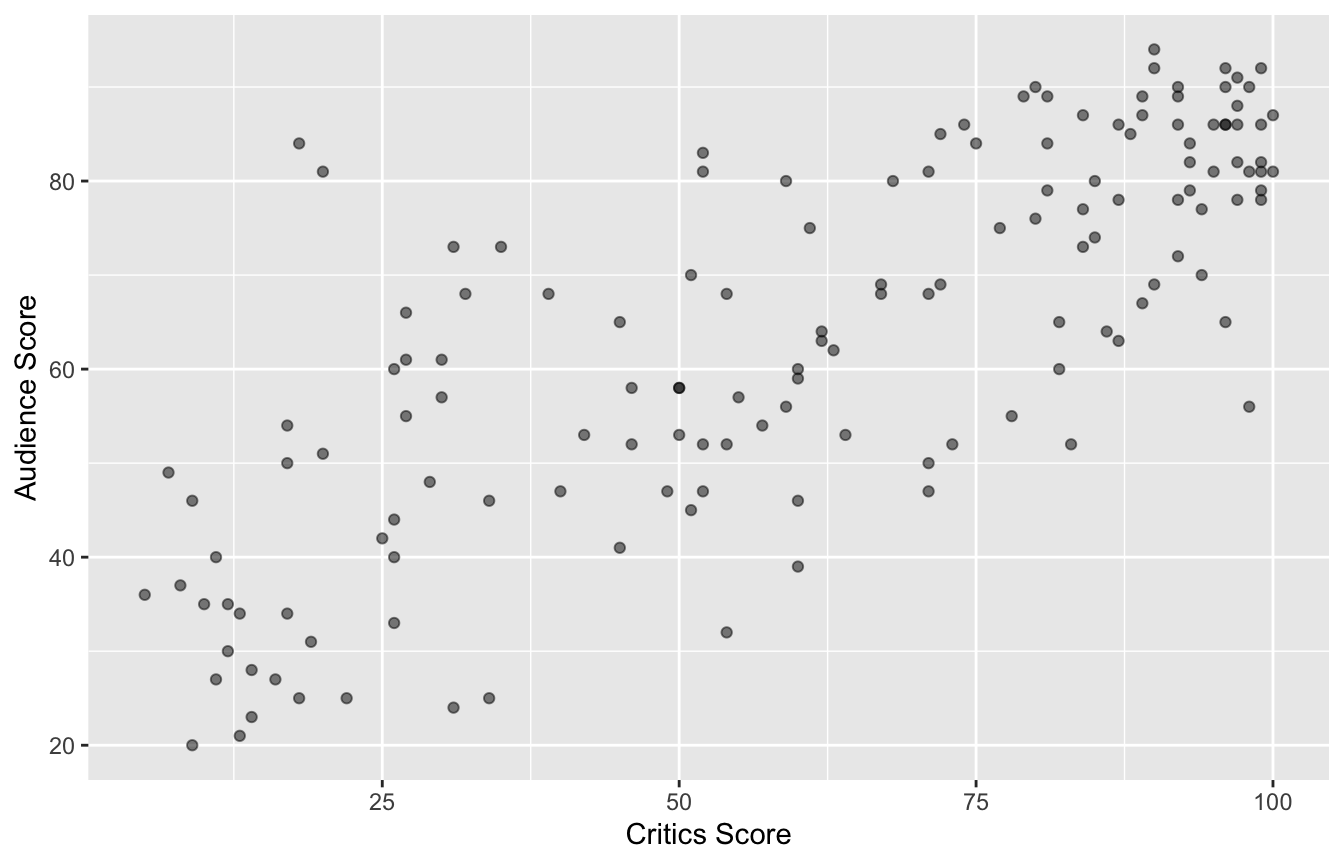
Quick aside: which is which?
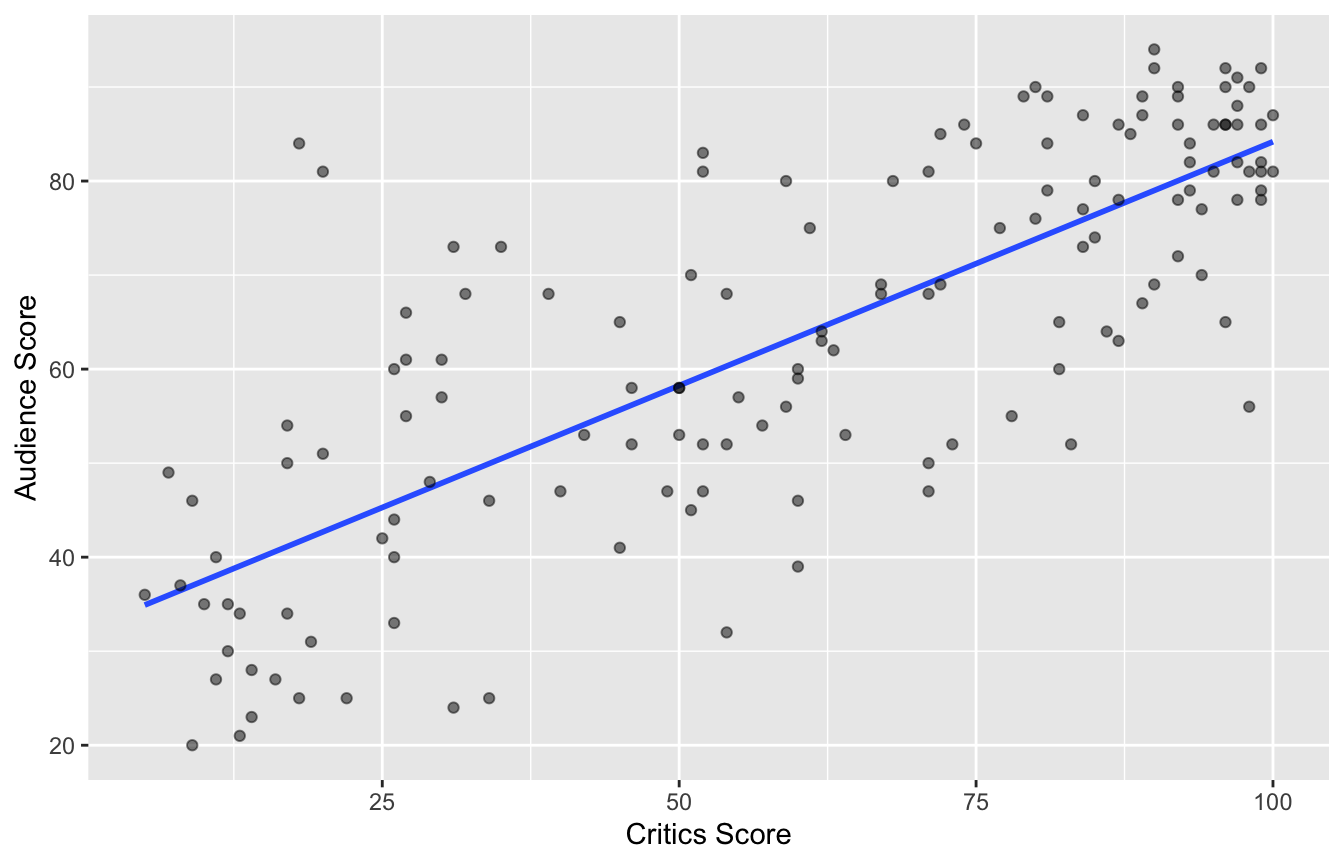
How do we know which variable “should” be the response and which should be the predictor. This will depend on the domain and the research question, but in some cases there is a natural choice. In this example, the critic score for a film is typically available before the audience score. Critics can often screen the film in advance, and their reviews are published on opening day. By contrast, the audience score trickles in over the subsequent weeks. So it’s more likely that we would already have the critics score and use it to anticipate the audience score, instead of the other way around.
Data visualization: linear model
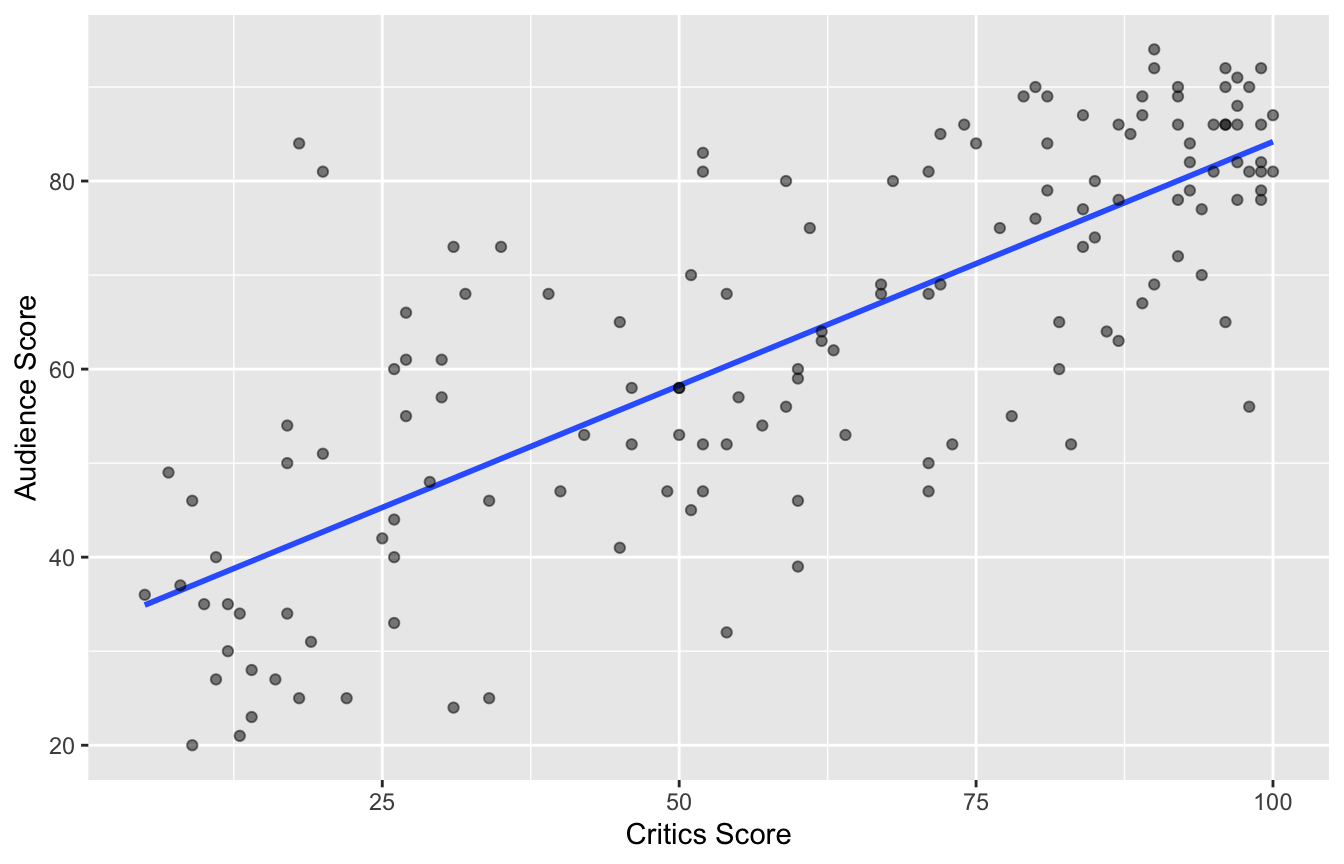
# A tibble: 2 × 5
  term        estimate std.error statistic  p.value
  <chr>          <dbl>     <dbl>     <dbl>    <dbl>
1 (Intercept)   32.3      2.34        13.8 4.03e-28
2 critics        0.519    0.0345      15.0 2.70e-31
Data visualization: linear model
# A tibble: 2 × 5
  term        estimate std.error statistic  p.value
  <chr>          <dbl>     <dbl>     <dbl>    <dbl>
1 (Intercept)   32.3      2.34        13.8 4.03e-28
2 critics        0.519    0.0345      15.0 2.70e-31
# A tibble: 1 × 1
r
<dbl>
1 0.781Prediction
Simple Linear Regression: How R Did It
Regression model
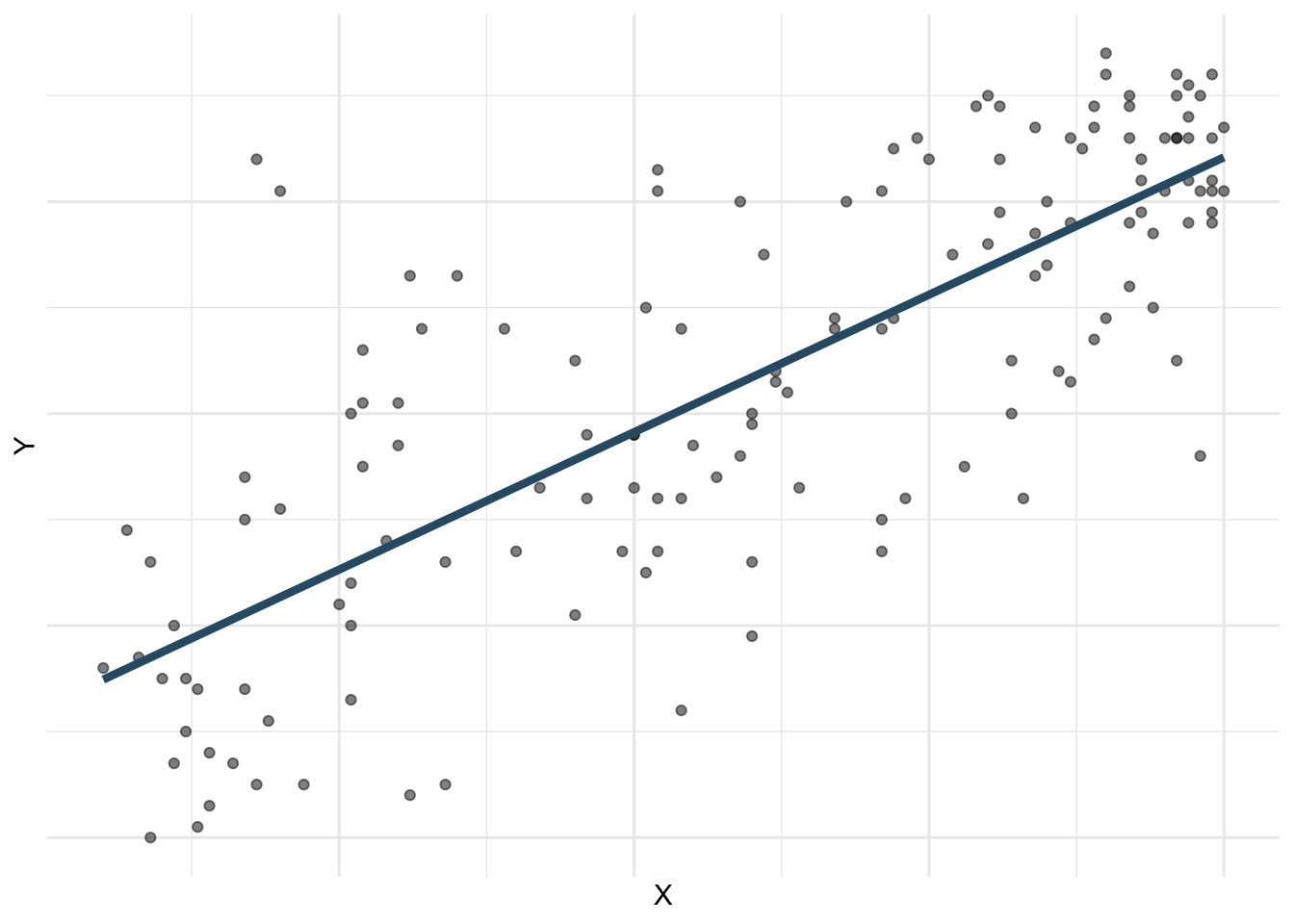
A regression model is a function that describes the relationship between the outcome, \(Y\), and the predictor, \(X\).
\[ \begin{aligned} Y &= \color{black}{\textbf{Model}} + \text{Error} \\[8pt] &= \color{black}{\mathbf{f(X)}} + \epsilon \\[8pt] &= \color{black}{\boldsymbol{\mu_{Y|X}}} + \epsilon \end{aligned} \]
Regression model
\[ \begin{aligned} Y &= \color{#325b74}{\textbf{Model}} + \text{Error} \\[8pt] &= \color{#325b74}{\mathbf{f(X)}} + \epsilon \\[8pt] &= \color{#325b74}{\boldsymbol{\mu_{Y|X}}} + \epsilon \end{aligned} \]
Simple linear regression
Use simple linear regression to model the relationship between a quantitative outcome (\(Y\)) and a single quantitative predictor (\(X\)):
\[\Large{Y = \beta_0 + \beta_1 X + \epsilon}\]
- \(\beta_1\): True slope of the relationship between \(X\) and \(Y\)
- \(\beta_0\): True intercept of the relationship between \(X\) and \(Y\)
- \(\epsilon\): Error (residual)
Simple linear regression
\[\Large{\hat{Y} = b_0 + b_1 X}\]
- \(b_1\): Estimated slope of the relationship between \(X\) and \(Y\)
- \(b_0\): Estimated intercept of the relationship between \(X\) and \(Y\)
- No error term!
Why did the notation change?
You’re already familiar with \(y=mx+b\), so why did I switch it up on you? Why the subscripts? Why the Greek letters?
- Today, we’re studying simple linear regression where there is only one predictor. Next week, we study multiple linear regression where there are many predictors, and each one gets its own coeffient. When you go from 1 predictor to 5 or 10 or 1,000, you run out of letters. So it’s easier to number them;
- The Greek letters denote true, idealized, population values. These are unknown. If we had perfect data, we would know them, but we don’t. Womp womp;
- The lowercase roman letters denote estimated values based on a finite, imperfect sample. These are our best guess at the true values based on the data we have.
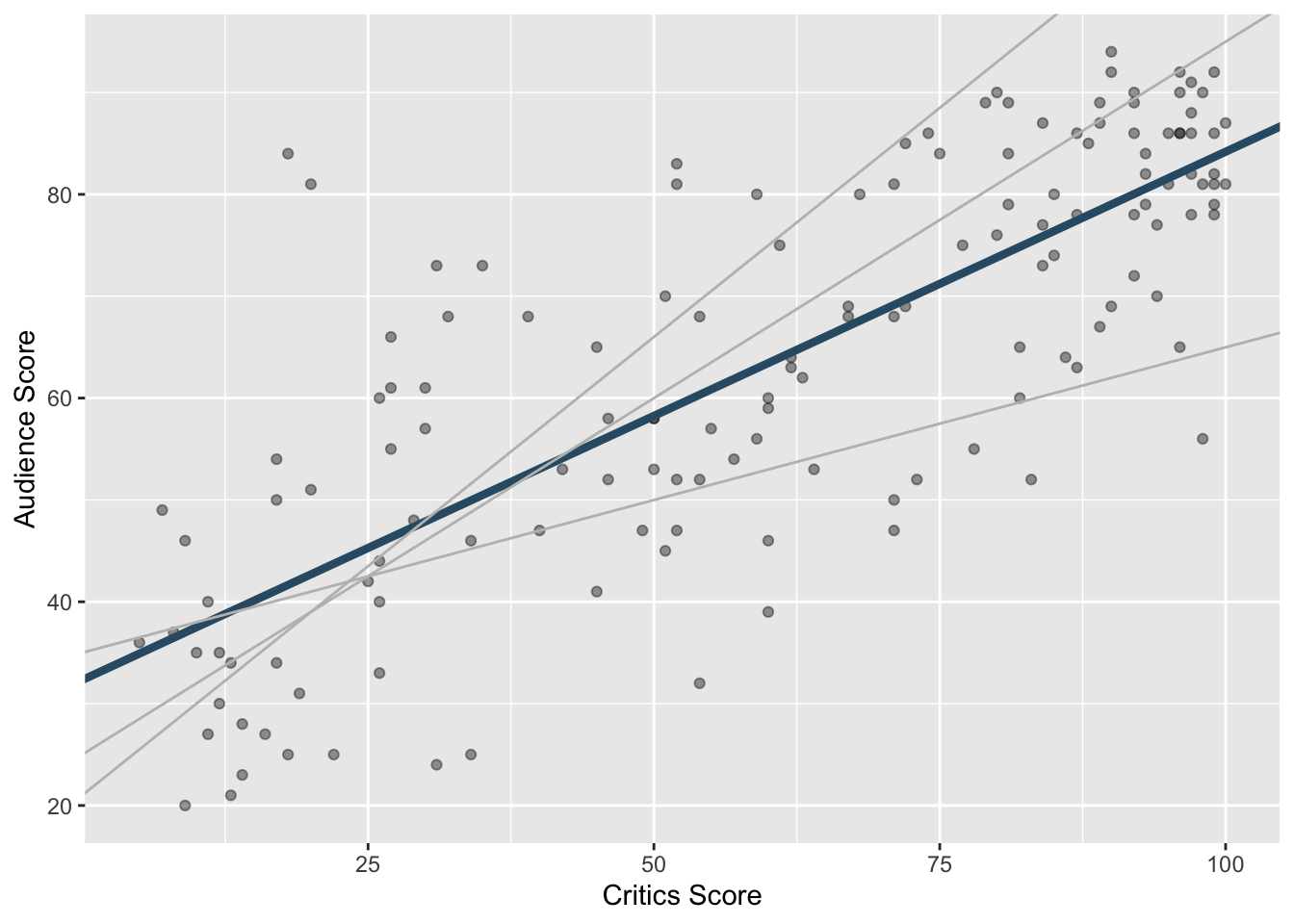
Choosing values for \(b_1\) and \(b_0\)
Residuals
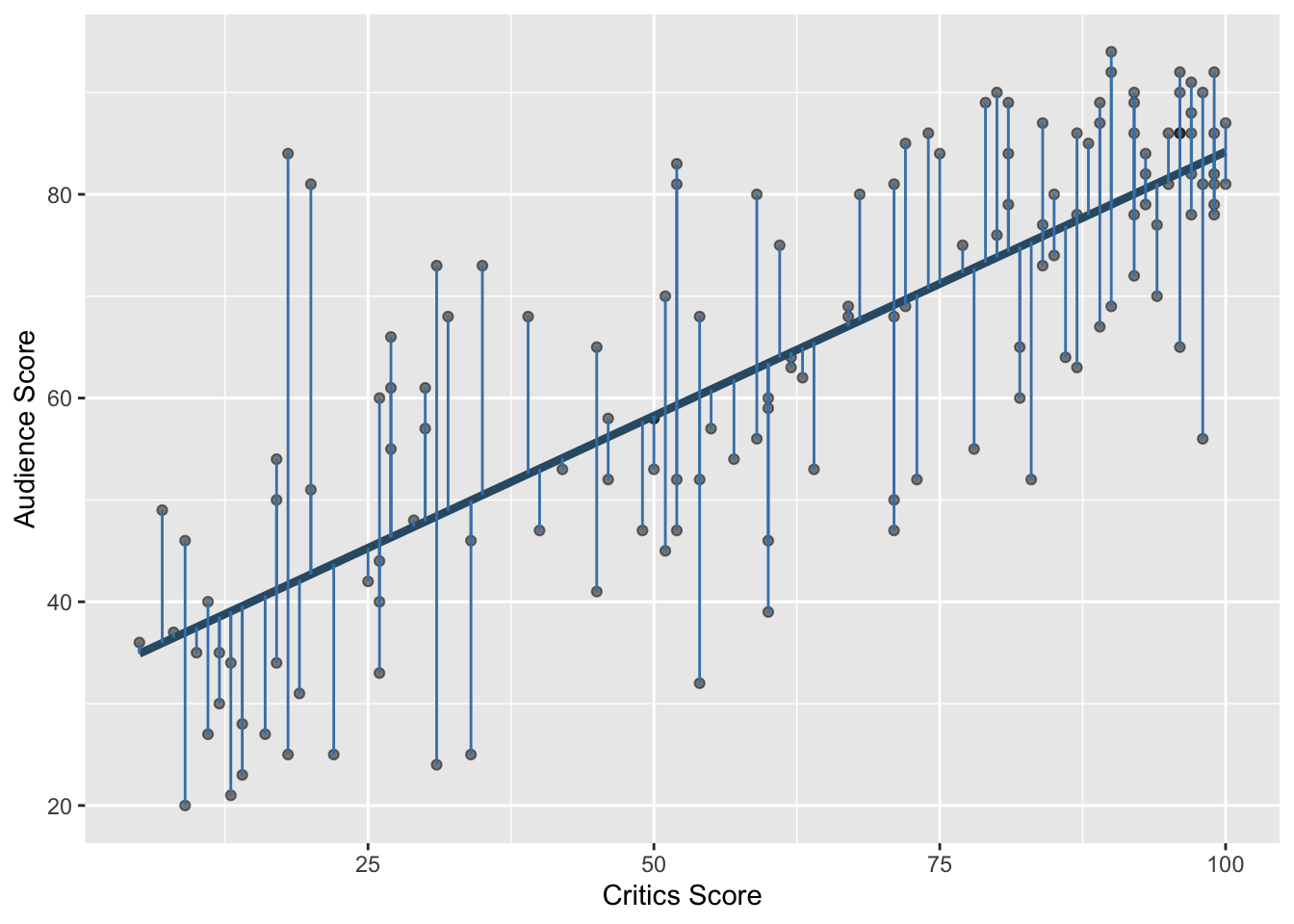
\[\text{residual} = \text{observed} - \text{predicted} = y - \hat{y}\]
Notation
We have \(n\) observations (generally, the number of rows in a df)
-
\(i^{th}\) observation (\(i\) from \(1\) to \(N\)):
\(y_i\) : \(i^{th}\) outcome
\(x_i\) : \(i^{th}\) explanatory variable
\(\hat{y}\) : \(i^{th}\) predicted outcome
\(e\) : \(i^{th}\) residual
Least squares line
- The residual for the \(i^{th}\) observation is
\[e_i = \text{observed} - \text{predicted} = y_i - \hat{y}_i\]
- The sum of squared residuals is
\[e^2_1 + e^2_2 + \dots + e^2_n\]
- The least squares line is the one that minimizes the sum of squared residuals
Least squares line
movies_fit <- linear_reg() |>
  fit(audience ~ critics, data = movie_scores)

tidy(movies_fit)
# A tibble: 2 × 5
term estimate std.error statistic p.value
<chr> <dbl> <dbl> <dbl> <dbl>
1 (Intercept) 32.3 2.34 13.8 4.03e-28
2 critics 0.519 0.0345 15.0 2.70e-31
fit syntax
If you recall ggplot, it takes two arguments: a data frame and an aesthetic mapping that specifies what columns to use and how to use them. fit is similar. It takes two arguments: a data frame and a formula that species what variables to include in the model and how.
linear_reg() |>
  fit(y ~ x, df)
The statement y ~ x is called a formula in R. The variable name that appears to the left of the tilde (~) is treated as the response variable, and the variable(s!) to the right of the tilde are treated as explanatory.
Prediction
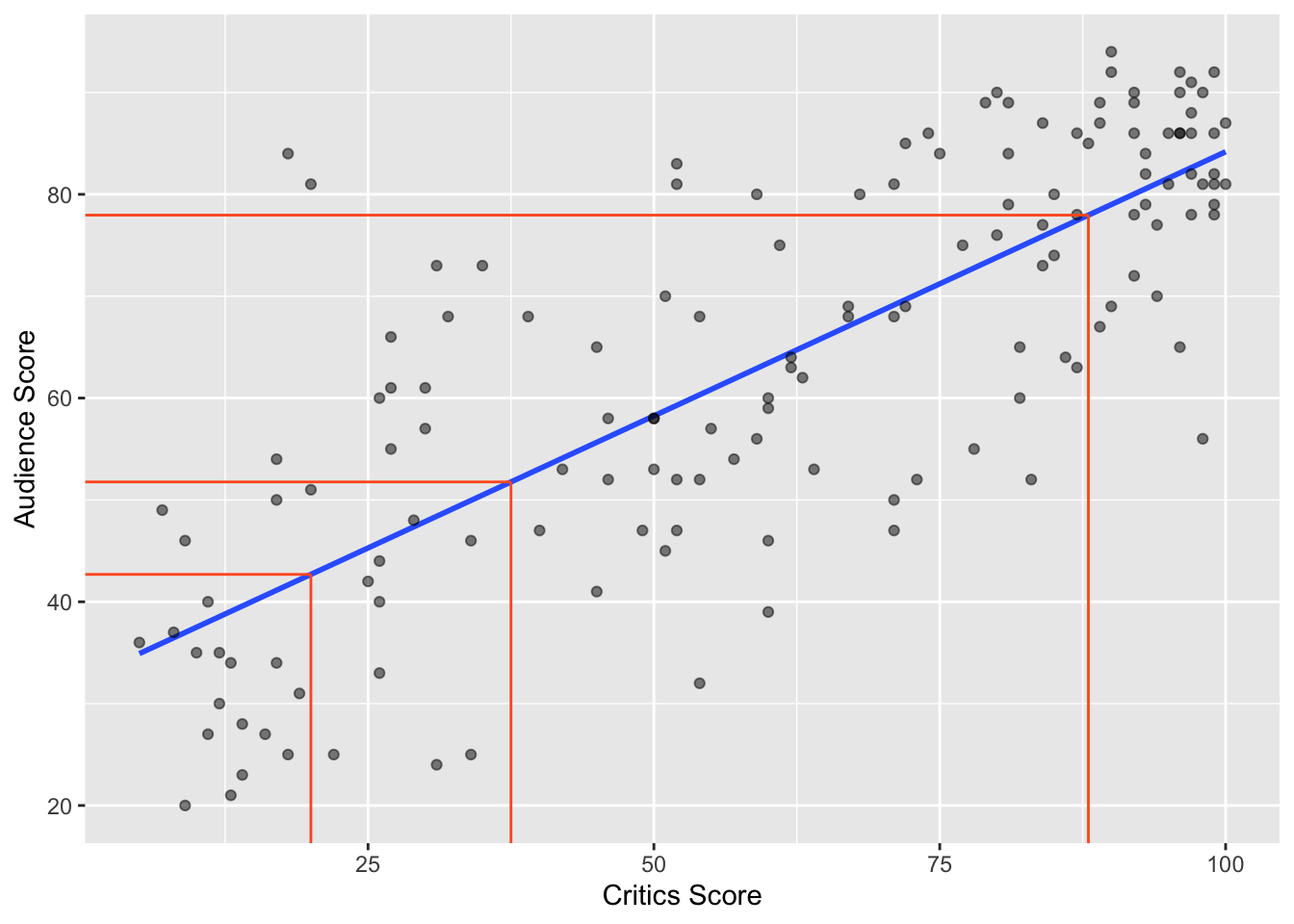
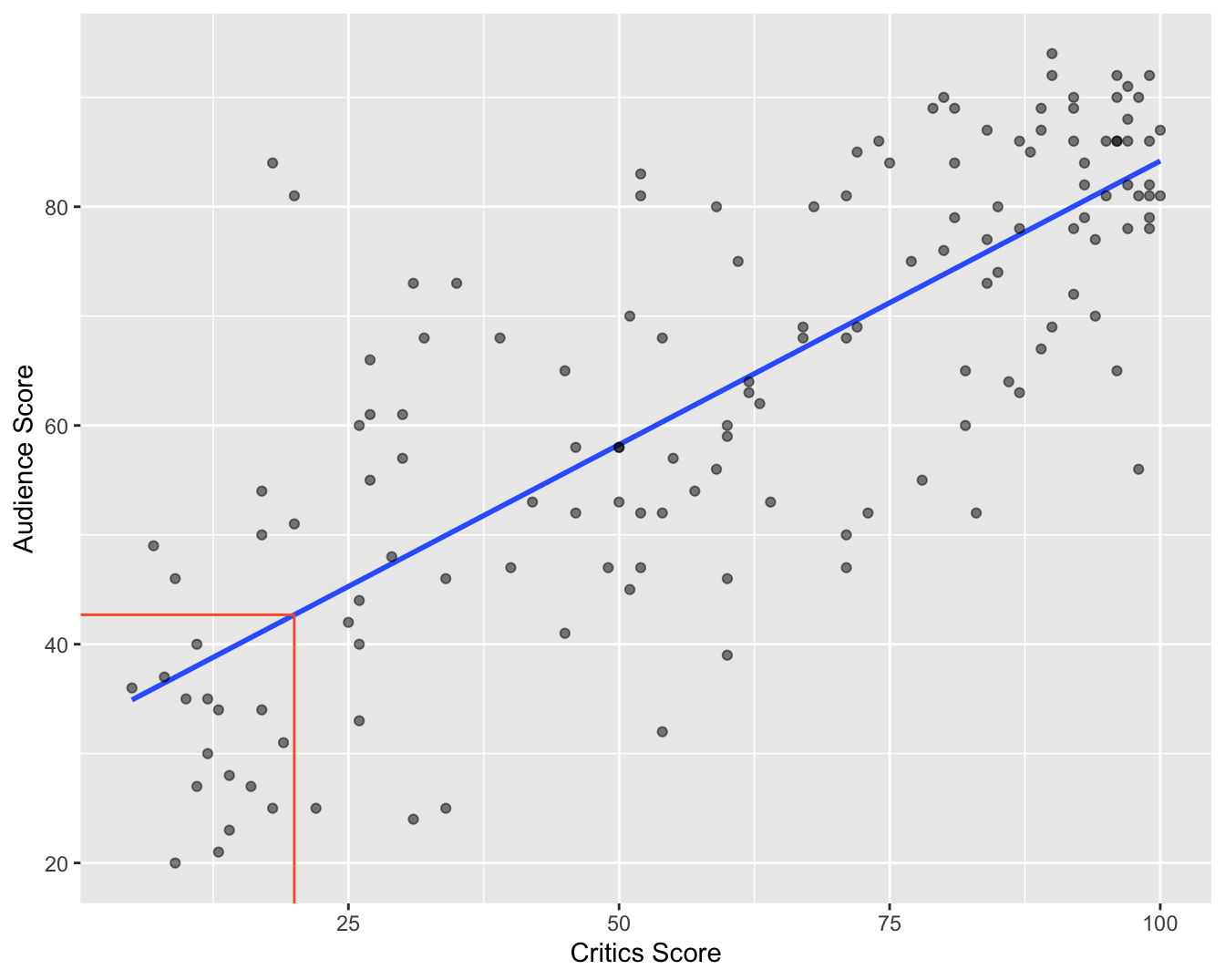
A new movie with a critic score of \(x = 20\) is released, and the model predicts that the audience score will be \(\hat{y}\approx 42.69\) on average:
Slope and intercept
Participate 📱💻
The slope of the model for predicting audience score from critics score is 0.519. Which of the following is the best interpretation of this value?
\[\widehat{\text{audience}} = 32.3 + 0.519 \times \text{critics}\]
- For every one point increase in the critics score, the audience score goes up by 0.519 points, on average.
- For every one point increase in the critics score, we expect the audience score to be higher by 0.519 points, on average.
- For every one point increase in the critics score, the audience score goes up by 0.519 points.
- For every one point increase in the audience score, the critics score goes up by 0.519 points, on average.
Scan the QR code or go HERE. Log in with your Duke NetID.
Participate 📱💻
The intercept of the model for predicting audience score from critics score is 32.3. Which of the following is the best interpretation of this value?
\[\widehat{\text{audience}} = 32.3 + 0.519 \times \text{critics}\]
- For movies with a critics score of 0 points, we expect the audience score to be 32.3 points, on average.
- For movies with an audience score of 0 points, we expect the critics score to be 32.3 points, on average.
- For every one point increase in the critics score, the audience score goes up by 32.3 points.
- For movies with an audience score of 0 points, we expect the critics score to be 0.519 points, on average.
Scan the QR code or go HERE. Log in with your Duke NetID.
Correct
\[\widehat{\text{audience}} = 32.3 + 0.519 \times \text{critics}\]
- Slope: for every one point increase in the critics score, we expect the audience score to be higher by 0.519 points, on average;
- Intercept: for movies with an audience score of 0 points, we expect the critics score to be 32.3 points, on average.
The “we expect” and “on average” are a bit redundant, but let’s go belt and suspenders in this class.
Things to watch out for
When interpreting coefficient estimates in a regression:
- avoid causal-sounding language;
- bad: “a one unit increase in
xmakesygo up by 0.519;”
- bad: “a one unit increase in
- don’t make guarantees;
- bad: “if
x = 0, thenywill be 32.3;”
- bad: “if
- be explicitly predictive;
- good: “if
xincreases by one unit, we expect/predict thatywill be higher by 0.519 on average”
- good: “if
In general, our models give imperfect predictions about average behavior. The predictions are not guarantees, and the relationship may or may not be causal. Establishing that is an entire class in and of itself.
Is the intercept meaningful?
✅ The intercept is meaningful in context of the data if
- the predictor can feasibly take values equal to or near zero or
- the predictor has values near zero in the observed data
. . .
🛑 Otherwise, it might not be meaningful!
. . .
For our examples so far…
- It doesn’t make sense to predict the mpg of a car that weighs 0 pounds;
- It does make sense to predict the ice duration of a lake at 0 degree temp;
- It does make sense to predict audience score if the critics gave the movie a 0%.
Properties of least squares regression
The regression line goes through the center of mass point (the coordinates corresponding to average \(X\) and average \(Y\)): \(b_0 = \bar{Y} - b_1~\bar{X}\)
Slope has the same sign as the correlation coefficient: \(b_1 = r \frac{s_Y}{s_X}\)
Sum of the residuals is zero: \(\sum_{i = 1}^n \epsilon_i = 0\)
Residuals and \(X\) values are uncorrelated
Goodness-of-fit
- Correlation is a number between -1 and 1 measuring the strength and direction of the linear association between two numerical variables (\(X\) and \(Y\));
- If you square it, you get \(R^2\) (“\(R\) squared”) or the coefficient of determination;
- This is a number between 0 and 1 measuring how well the linear model fits the data:
- \(R^2=1\) means linear fit is perfect;
- \(R^2=0\) means linear fit is perfectly wretched;
- Technically, \(R^2\) measures the fraction of the variation in the response \(Y\) explained by the model (more on this later).
Correlation and \(R^2\)
`geom_smooth()` using formula = 'y ~ x'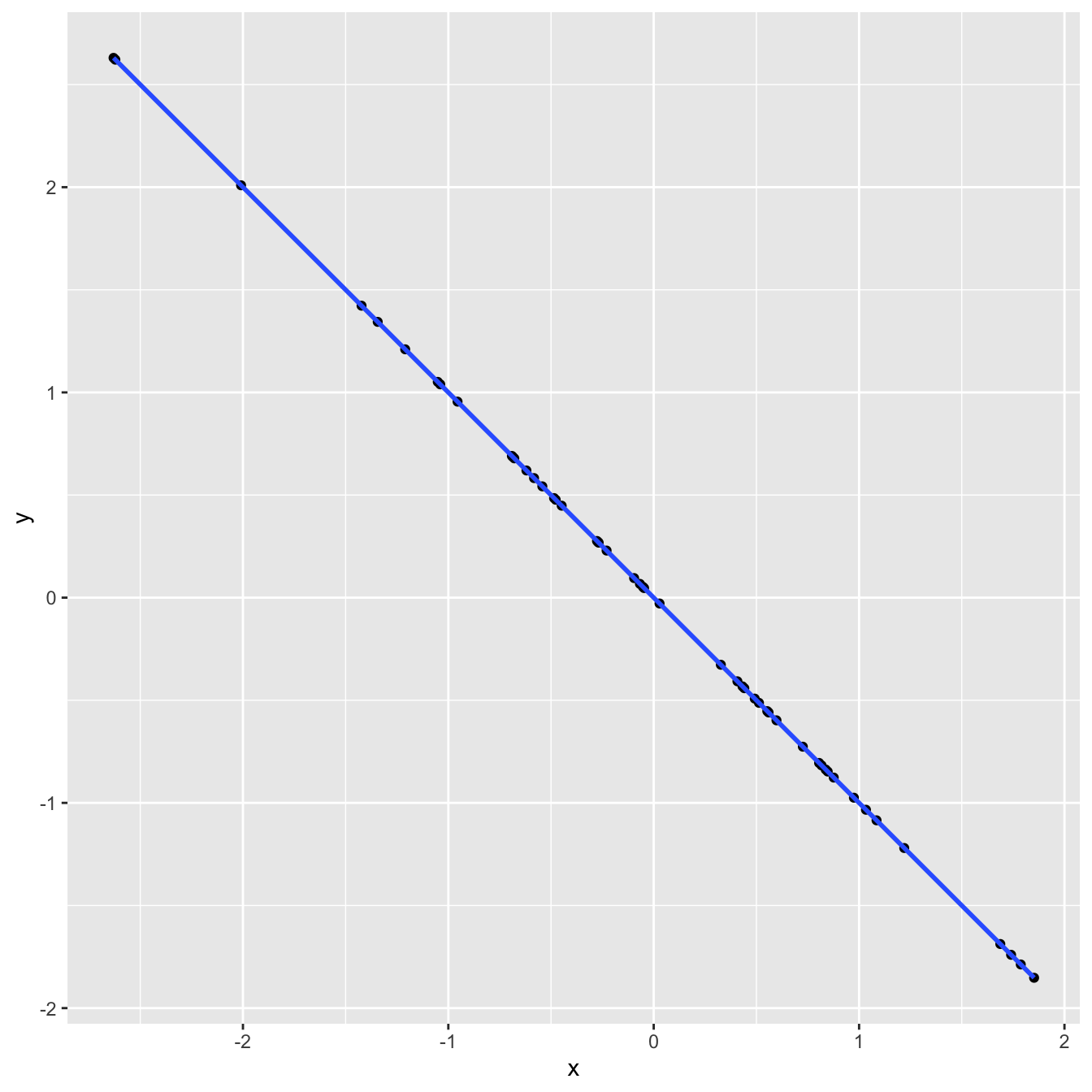
df |>
  summarize(
    r = cor(x, y)
  )
# A tibble: 1 × 1
r
<dbl>
1 -1linear_reg() |>
fit(y ~ x, df) |>
glance() |>
select(r.squared)# A tibble: 1 × 1
r.squared
<dbl>
1 1Correlation and \(R^2\)
`geom_smooth()` using formula = 'y ~ x'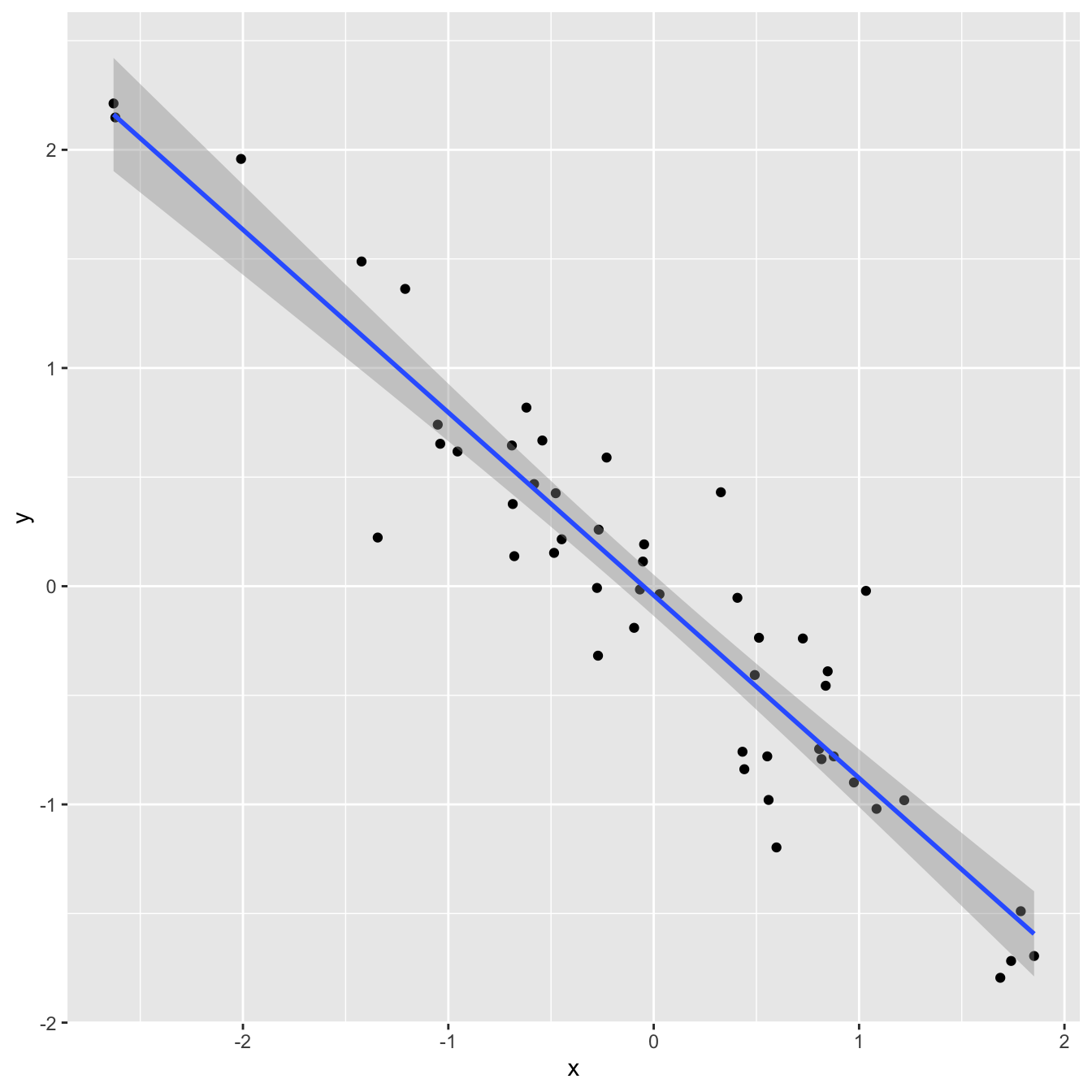
df |>
  summarize(
    r = cor(x, y)
  )
# A tibble: 1 × 1
r
<dbl>
1 -0.935linear_reg() |>
fit(y ~ x, df) |>
glance() |>
select(r.squared)# A tibble: 1 × 1
r.squared
<dbl>
1 0.875Correlation and \(R^2\)
`geom_smooth()` using formula = 'y ~ x'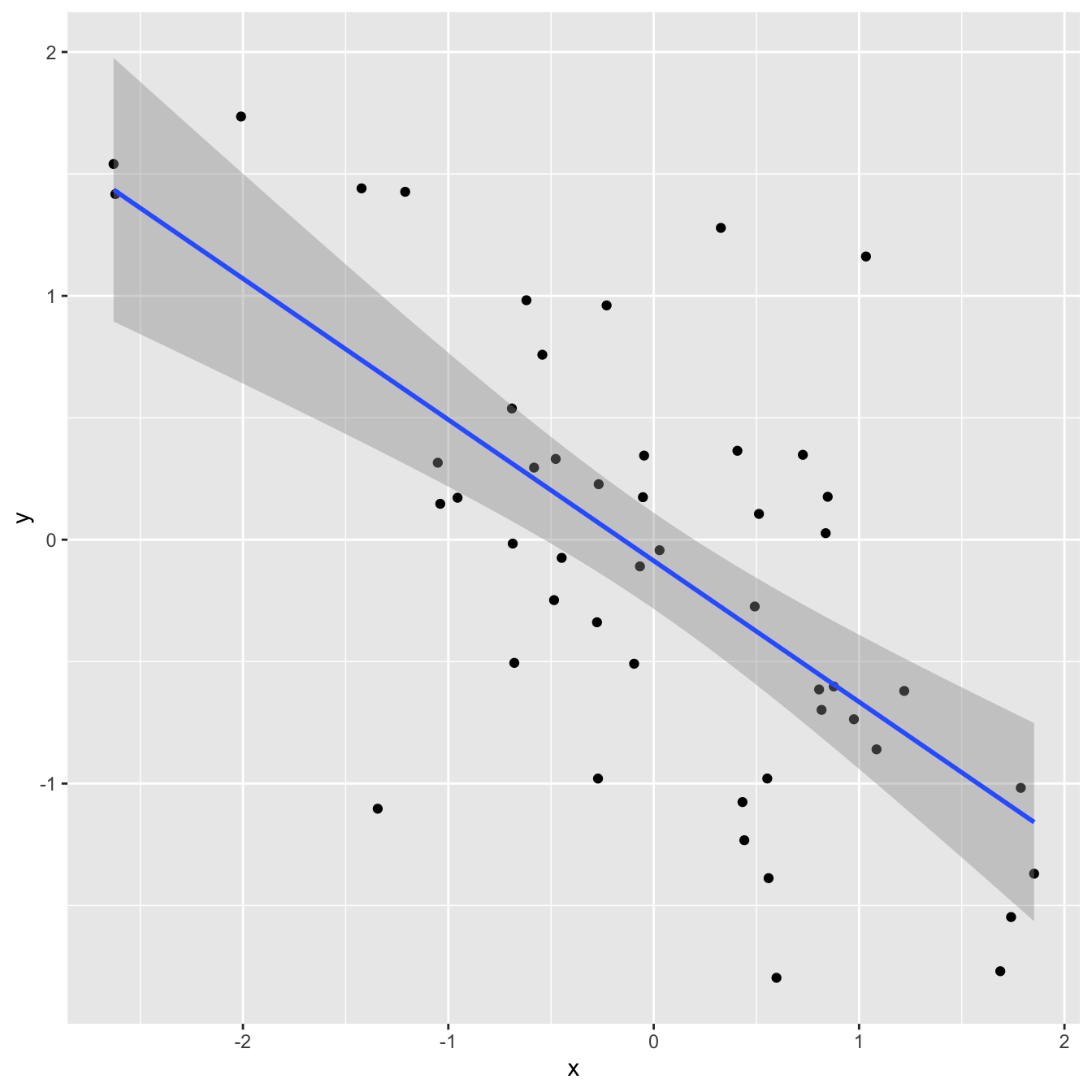
df |>
  summarize(
    r = cor(x, y)
  )
# A tibble: 1 × 1
r
<dbl>
1 -0.659linear_reg() |>
fit(y ~ x, df) |>
glance() |>
select(r.squared)# A tibble: 1 × 1
r.squared
<dbl>
1 0.434Correlation and \(R^2\)
`geom_smooth()` using formula = 'y ~ x'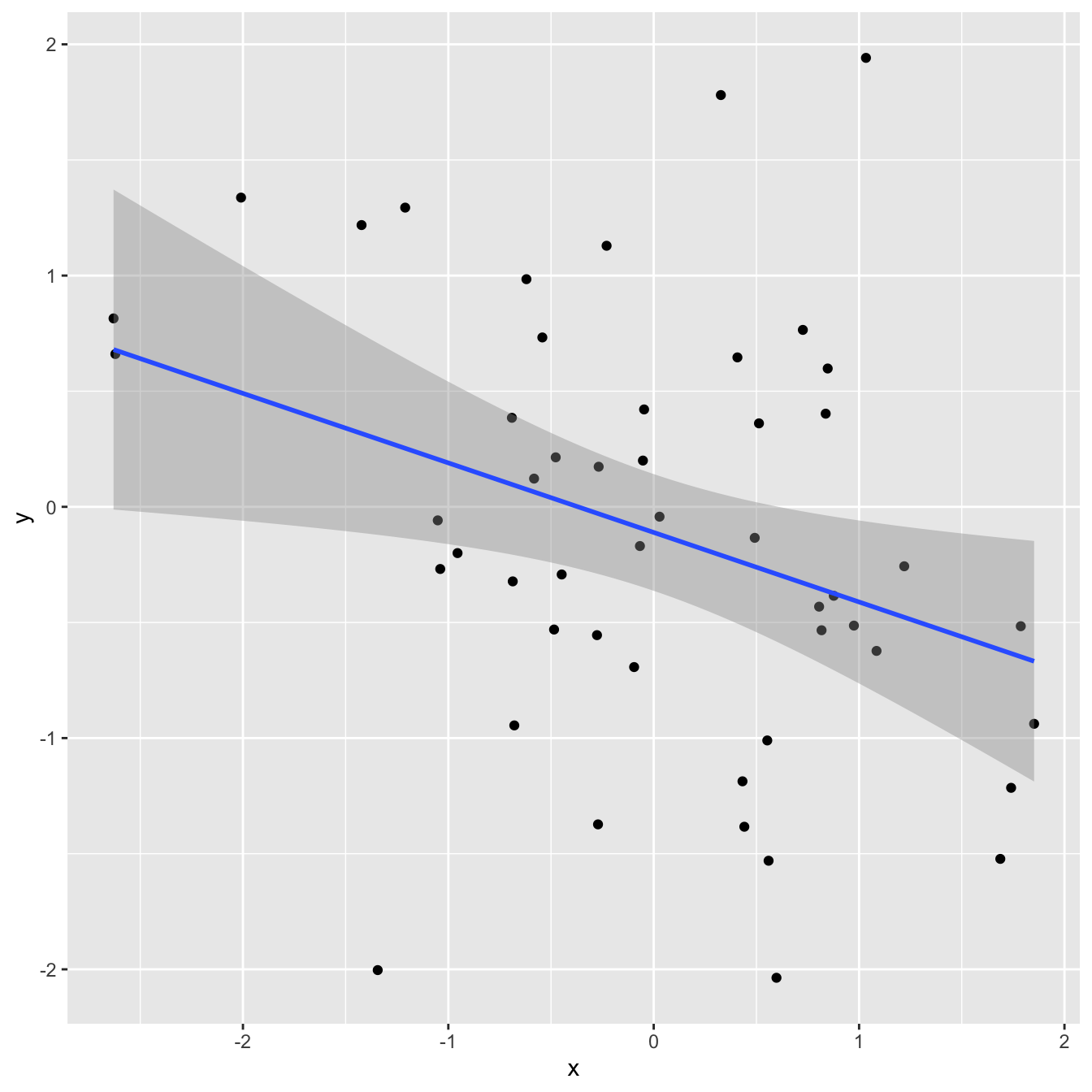
df |>
  summarize(
    r = cor(x, y)
  )
# A tibble: 1 × 1
r
<dbl>
1 -0.335linear_reg() |>
fit(y ~ x, df) |>
glance() |>
select(r.squared)# A tibble: 1 × 1
r.squared
<dbl>
1 0.112Correlation and \(R^2\)
`geom_smooth()` using formula = 'y ~ x'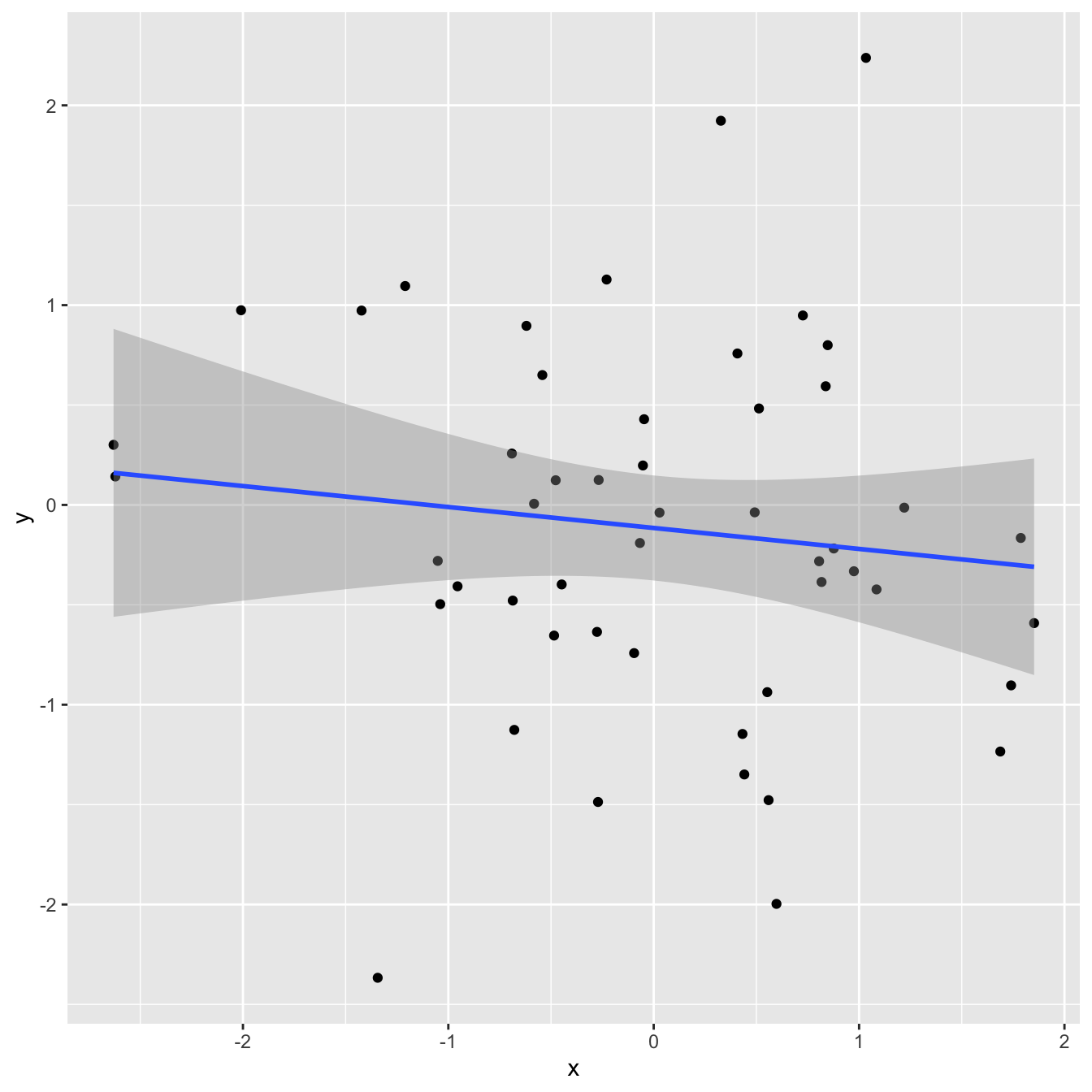
df |>
  summarize(
    r = cor(x, y)
  )
# A tibble: 1 × 1
r
<dbl>
1 -0.118linear_reg() |>
fit(y ~ x, df) |>
glance() |>
select(r.squared)# A tibble: 1 × 1
r.squared
<dbl>
1 0.0140Correlation and \(R^2\)
`geom_smooth()` using formula = 'y ~ x'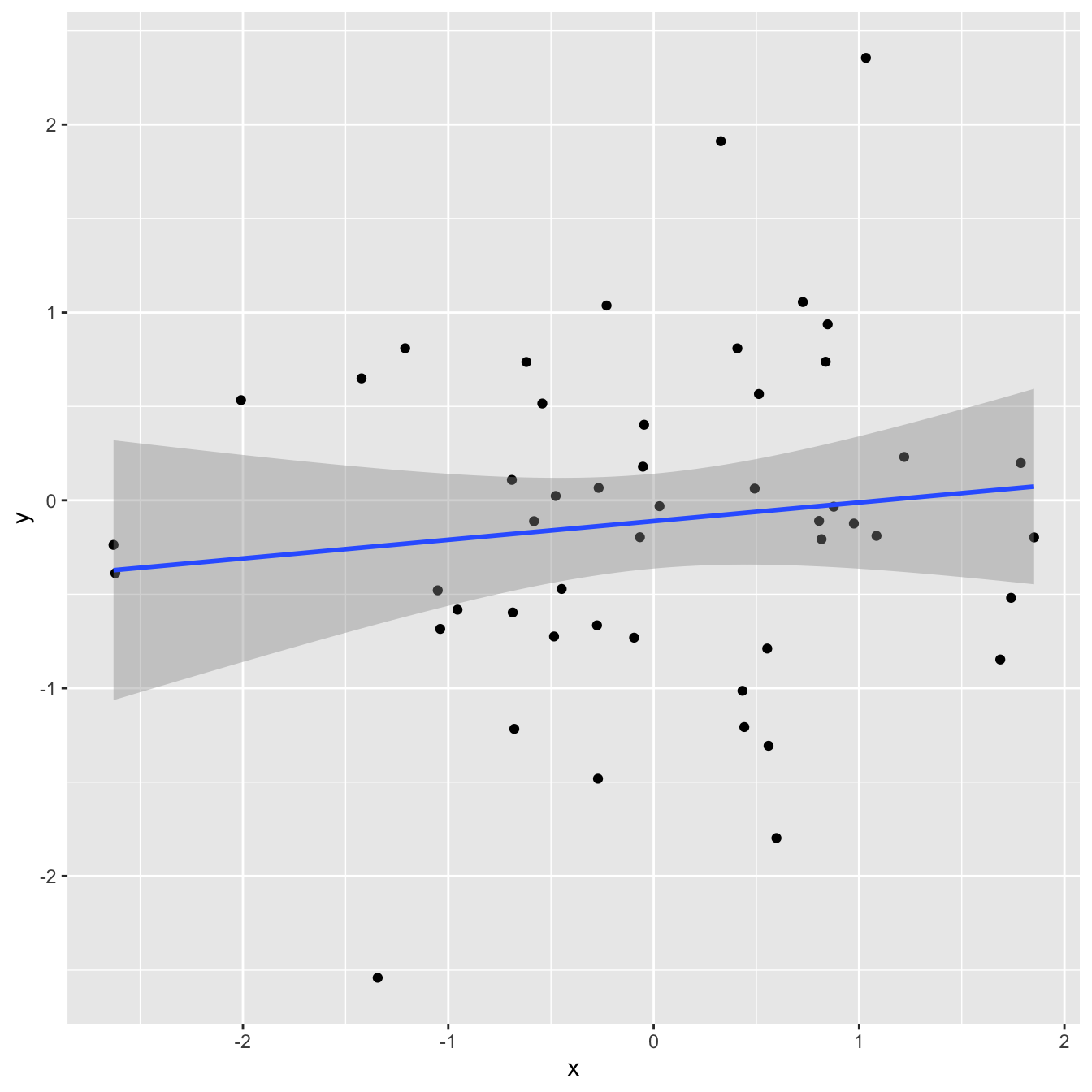
df |>
  summarize(
    r = cor(x, y)
  )
# A tibble: 1 × 1
r
<dbl>
1 0.117linear_reg() |>
fit(y ~ x, df) |>
glance() |>
select(r.squared)# A tibble: 1 × 1
r.squared
<dbl>
1 0.0136Correlation and \(R^2\)
`geom_smooth()` using formula = 'y ~ x'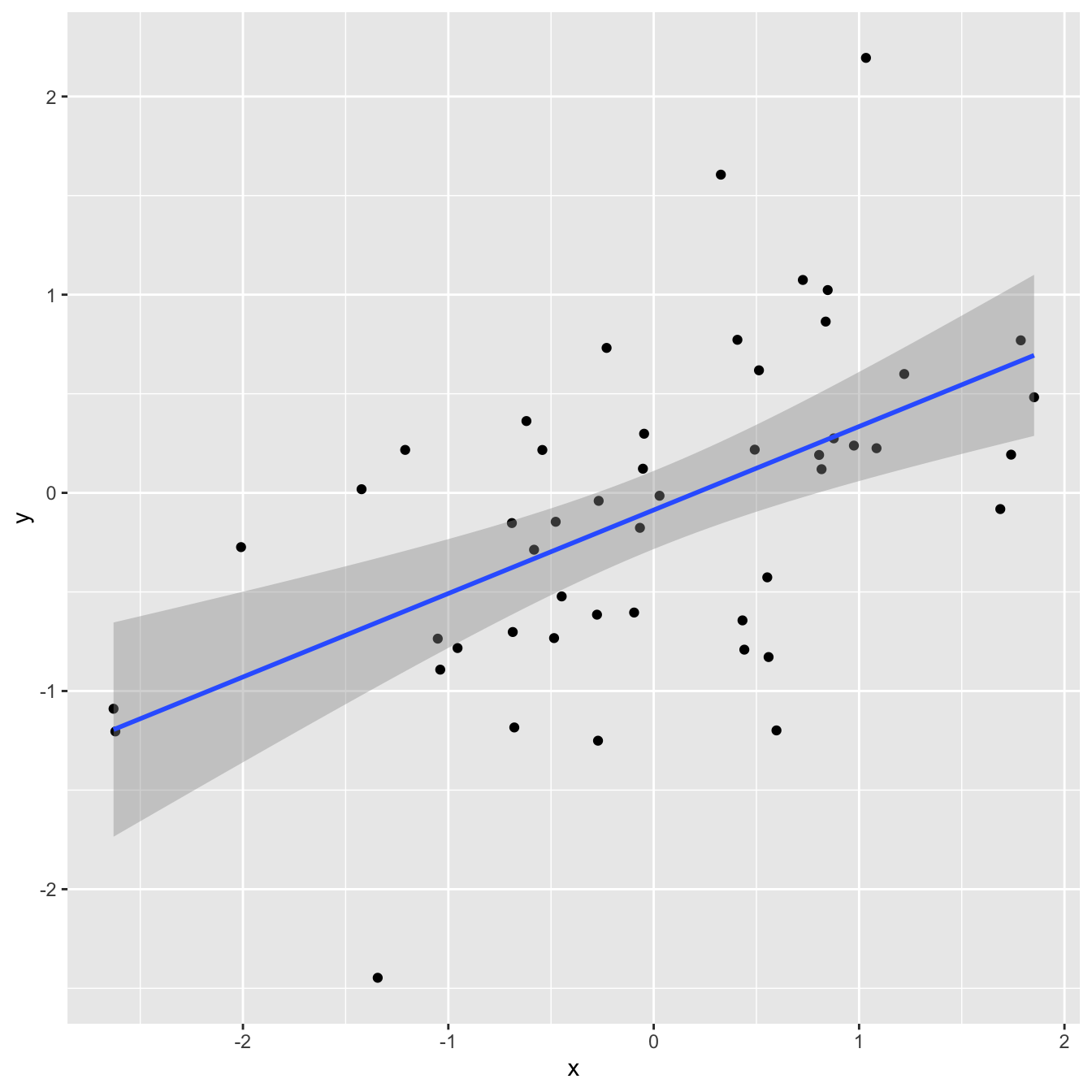
df |>
  summarize(
    r = cor(x, y)
  )
# A tibble: 1 × 1
r
<dbl>
1 0.538linear_reg() |>
fit(y ~ x, df) |>
glance() |>
select(r.squared)# A tibble: 1 × 1
r.squared
<dbl>
1 0.289Correlation and \(R^2\)
`geom_smooth()` using formula = 'y ~ x'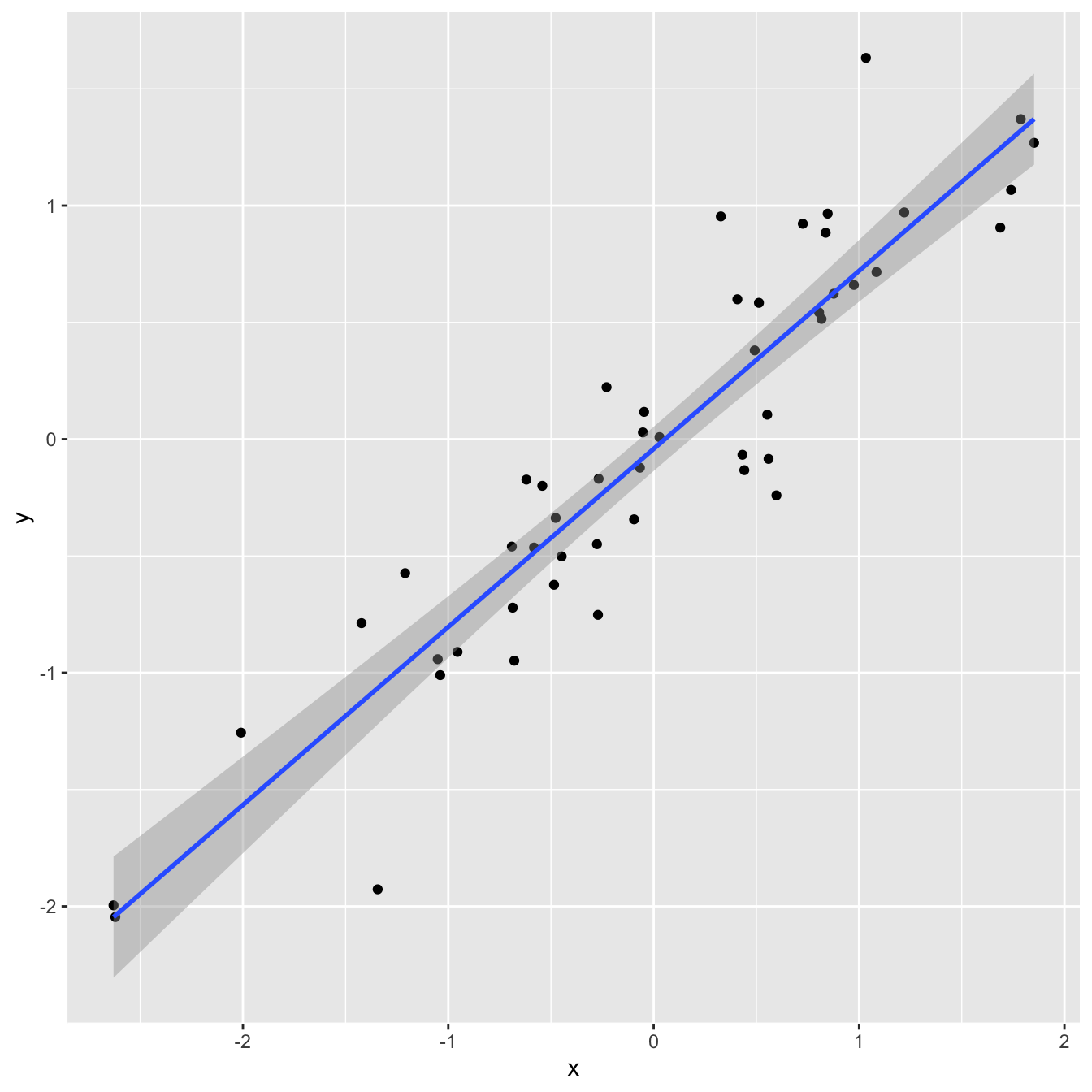
df |>
  summarize(
    r = cor(x, y)
  )
# A tibble: 1 × 1
r
<dbl>
1 0.923linear_reg() |>
fit(y ~ x, df) |>
glance() |>
select(r.squared)# A tibble: 1 × 1
r.squared
<dbl>
1 0.853Correlation and \(R^2\)
`geom_smooth()` using formula = 'y ~ x'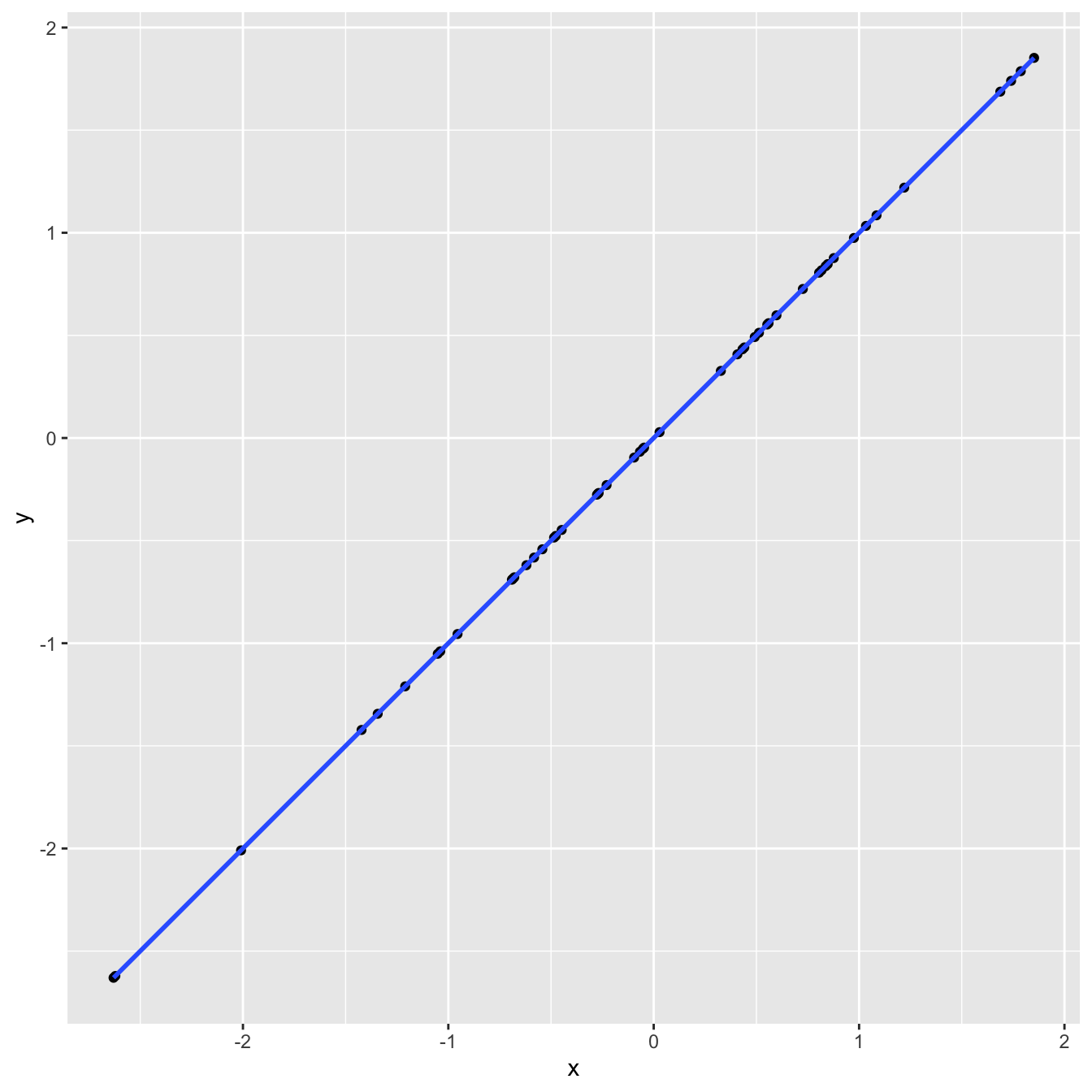
df |>
  summarize(
    r = cor(x, y)
  )
# A tibble: 1 × 1
r
<dbl>
1 1linear_reg() |>
fit(y ~ x, df) |>
glance() |>
select(r.squared)# A tibble: 1 × 1
r.squared
<dbl>
1 1Application exercise
ae-16-modeling-penguins
Go to your ae project in RStudio.
If you haven’t yet done so, make sure all of your changes up to this point are committed and pushed, i.e., there’s nothing left in your Git pane.
If you haven’t yet done so, click Pull to get today’s application exercise file: ae-16-modeling-penguins.qmd.
Work through the application exercise in class, and render, commit, and push your edits.